StormWatch+
Cirrus Weather Solutions, LLCWeather
3.333.00 Reviews
- Version
- 8.2.2
- Installs
- 10.00K
- Age Rating
- Everyone
Screenshots
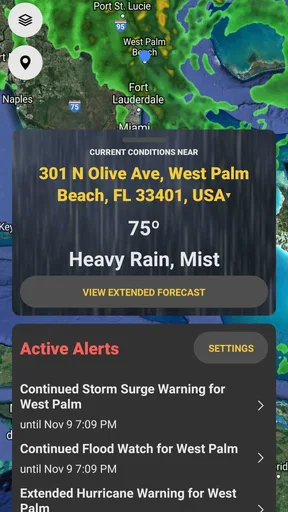
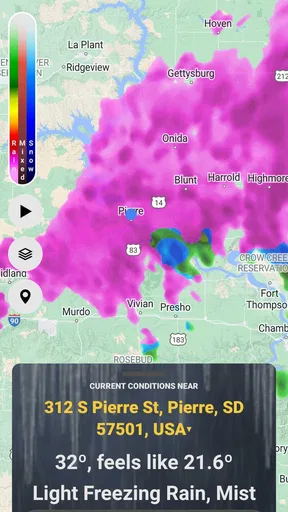
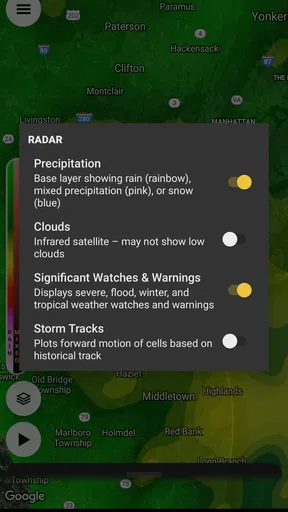
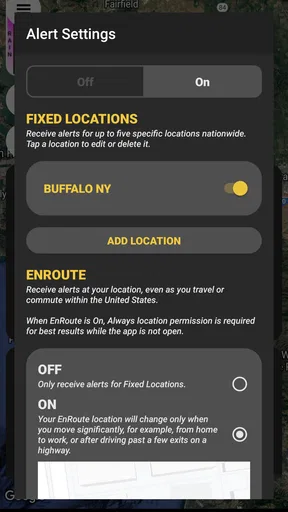
Our Review of StormWatch+
 Analysis by Appyee
I judge a weather app less by how dramatic its maps look than by whether it helps me make a sensible decision without creating new uncertainty. StormWatch+ is aimed at local conditions as well as weather across the country, so its appeal is easy to understand: it offers a place to check what may be happening near home and keep an eye on wider weather. That can be useful, but severe-weather information is only helpful when I understand what it tells me and what I still need to verify.
Trust matters especially when an app deals with a person’s location and sends urgent notifications. I would treat StormWatch+ as one tool in a weather routine, not as a substitute for official emergency instructions or local authorities. Before relying on any weather app for safety decisions, I make a point of checking the choices it actually presents, reviewing device-level access, and deciding whether its alerts fit my needs. I also avoid assuming that a polished map or a confident notification tells the whole story.
What the app can and cannot promise in practice
StormWatch+ is a free weather app from Cirrus Weather Solutions, LLC, with optional in-app purchases priced from $0.99 to $9.99 per item. It has a 3.4 average from around 60 ratings, and more than 10,000 installs. Those figures suggest some users have found a reason to try it, while the middling average is a good reminder to approach it with ordinary expectations rather than assuming it will suit everyone.
The app is marked for Everyone and runs on Android 7.0 or later; version 8.2.1 is the current version. I would still check the current app screen and device compatibility before installing, since operating-system support and available choices can affect an individual experience. The key point for a safety-minded user is to explore the app before bad weather arrives, when there is time to learn where information appears and how notifications behave.
Make location and notifications deliberate choices
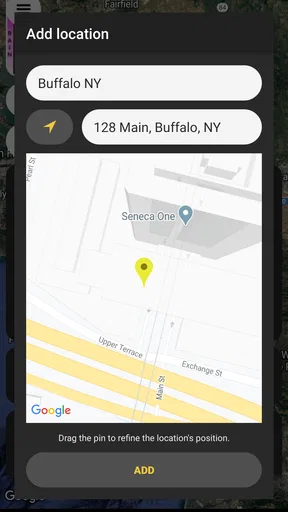
Weather is inherently local, but that does not mean I want every app to have unrestricted access to my location. I would look at the location options presented by StormWatch+ and my phone, then choose the narrowest setting that still supports the way I plan to use it. If I mainly check conditions at home, manually selecting or entering a place, where available, may be enough; if I need alerts while travelling, I would weigh that convenience against the extra location access involved.
Likewise, notification permission is a practical choice, not a test of whether I care about safety. A person who already receives emergency alerts through their phone or local services may prefer to limit duplicate notifications. Someone who wants weather prompts from this app should review the categories and timing it offers instead of leaving every option enabled by default. I would also check the phone’s notification settings after installation, because those controls can shape whether an alert is visible, muted, or allowed to interrupt.
Use weather reports as one layer of a safety plan
Sharing information with friends or family can be useful, but I would not assume that a shared report automatically reaches everyone or replaces a direct check-in. For a household, a simple routine works better: agree on which official source to follow, decide who contacts whom, and use app information as a prompt to compare notes. When conditions are serious, I would follow local emergency guidance rather than wait for a social update or interpret a map on my own.
Weather data can also feel more precise than it is. Radar imagery is a view of conditions, not a guarantee about exactly what will happen at a particular doorstep. I find it more useful to check how a system is moving and whether conditions are changing than to treat one snapshot as a firm prediction. Keeping that distinction in mind helps prevent both needless alarm and misplaced confidence.
Real-Time Alerts and Customization
One of the standout features of StormWatch+ is its real-time alert system. This app gives you the lowdown on severe weather situations as they unfold, ensuring you're not caught off guard. It's like having a personal meteorologist in your pocket, minus the green screen and fancy suits.
What I love about this is the customization options. You can tailor alerts to your specific location, which means you won't get bombarded with notifications about weather events that don't affect you. Plus, you can set quiet hours, so your phone won't wake you up at 3 AM unless it's absolutely necessary. Trust me, your sleep schedule will thank you.
Intuitive Interface and User Experience
The interface of StormWatch+ is as intuitive as it gets. From the moment you open the app, everything feels smooth and straightforward. No endless menus or confusing layouts. You get what you need right when you need it, without having to dig through a digital maze.
Navigation is a breeze, even for those who aren't exactly tech-savvy. The app is designed to make sure you can find what you're looking for with minimal fuss. Whether you're checking the radar or setting up alerts, it’s all incredibly user-friendly.
I would still spend a few minutes exploring before depending on those controls. Find the alert settings, check which location they apply to, and see whether the quiet-hours choice behaves as you expect. A useful test is to review the settings in daylight and then revisit them after a phone restart or a change in system notification preferences. That small check can reveal whether an alert is being managed by the app, by the operating system, or by both.
Detailed Weather Information
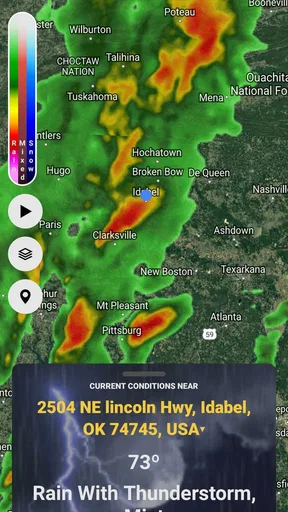
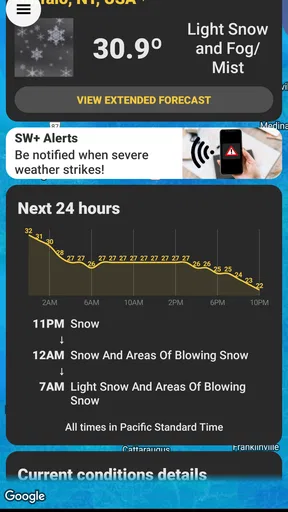
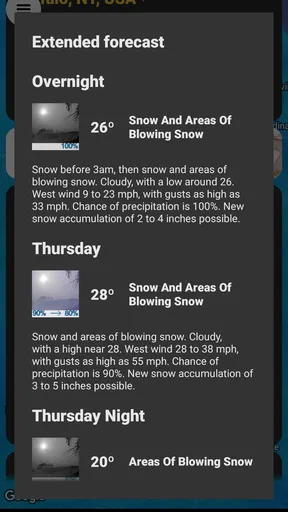
For those of us who love to geek out over weather data, StormWatch+ doesn't disappoint. It provides detailed weather information, including forecasts, radar maps, and even storm tracks. This is perfect for anyone who wants to keep an eye on what's happening in the sky above.
The radar feature is particularly noteworthy. It offers a clear, real-time view of what’s happening, which can be crucial when severe weather is on the horizon. You can literally watch the storm roll in, giving you a visual understanding of what’s happening.
One practical way I use radar is to answer a narrow question rather than stare at it continuously: is the rain moving toward my route, or away from it? Before leaving, I would compare the map with the forecast and allow extra time if the picture looks uncertain. For a commute, school pickup, or outdoor appointment, that is more actionable than trying to interpret every patch of color. If travel is optional and severe conditions are possible, delaying the trip is often wiser than treating a weather map as permission to go.
Storm tracks can help put a developing system in context, but they should not be read as a promise that a storm will follow one exact line. I would use them to decide when to check again and where to look for official updates, especially if the expected path is near my area. For someone who wants a simple answer such as whether to carry an umbrella, a standard forecast app may be quicker; StormWatch+ makes more sense when maps and storm movement are part of the decision.
Community and Safety Features
Another cool aspect of StormWatch+ is how it fosters community engagement. You can share weather reports and alerts with friends and family, making sure everyone stays informed. It’s like having a weather club, but without the meetings.
The app also emphasizes safety, offering tips and guidelines on what to do during various weather events. Whether it’s a tornado, hurricane, or blizzard, StormWatch+ has you covered with practical advice that can make a real difference when things get dicey.
For a realistic everyday example, imagine I have an outdoor errand after work and a storm is approaching. I can check the forecast first, use radar to see whether the system appears to be moving toward the route, and decide whether to leave earlier, change plans, or stay put. If family members are in different places, sharing a report can help start a conversation, but I would still confirm important warnings through trusted local channels. The value is in combining those steps, not expecting one app screen to make the decision for me.
This mix of maps, alerts, and safety guidance is most useful for people who like to understand why they may need to change plans. It is less compelling for someone who only wants a quick daily temperature and a basic rain chance; a lighter forecast app may involve less setup and less information to interpret. Conversely, people who follow storms closely may appreciate having radar and tracks alongside alerts, while still preferring an established official source for emergency directions.
Keep control visible as your needs change
My advice is to revisit choices when your routine changes. A location setting that makes sense at home may not be appropriate for a holiday, and quiet hours that work on ordinary nights may need reconsideration during a storm-prone period. I would also periodically review the app’s permissions from the phone’s settings rather than assuming the original choice is still right. This is a straightforward way to keep the convenience of local weather without granting access or interruptions by habit.
For privacy, I avoid making claims about practices I cannot verify from the controls in front of me. A careful user can inspect the app’s permission prompts, the phone’s privacy panel, and any privacy information presented in the app or its store page before deciding what to allow. If a requested permission does not seem necessary for the way I use a weather tool, I would pause and consider whether a more limited option is available. That approach keeps the decision in the user’s hands rather than relying on assumptions.
The optional purchases also deserve a quick check before spending. Since the app is free to install but offers items from $0.99 to $9.99, I would look at the exact item and what it unlocks at the point of purchase, then decide whether it addresses a real need. I would not pay simply because severe weather is stressful; core safety decisions should be based on clear information and official guidance, not pressure to buy an add-on.
Conclusion: A Must-Have Weather Companion
All in all, StormWatch+ is a stellar app for anyone who wants to stay on top of the weather. It combines real-time alerts, detailed data, and a user-friendly interface into one powerful package. Whether you're a weather junkie or just someone looking for a reliable way to stay safe, this app is definitely worth a download.
So, if you're ready to take control of your weather awareness, give StormWatch+ a try. You won't regret having this trusty companion by your side when the clouds start to gather.
My more cautious recommendation is to try it as a secondary source, set it up before you need it, and decide whether its alert and map workflow genuinely helps you. The average rating of 3.4 makes me less inclined to call it an automatic choice for everyone, and I would compare the experience with the weather app already on your phone before settling on it. If you want local weather with storm-focused tools and are comfortable checking permissions and settings, it is worth exploring. If you need the simplest possible forecast, dislike notifications, or want to rely on one source for emergency instructions, another option may suit you better.
Verdict
Strengths of StormWatch+
- Accurate weather alerts in real-time.
- Customizable notification settings.
- User-friendly interface design.
- Supports multiple locations tracking.
- Detailed radar and map features.
Limitations of StormWatch+
- Requires subscription for premium features.
- Limited free version capabilities.
- Occasional app performance lags.
- Notifications can be overwhelming.
- High data usage for radar updates.
Similar Picks in This Category
View All
Weather - By Xiaomi
Xiaomi Inc.4.1

Weather & Radar Forecast
WetterOnline4.8

Weather
OneLouder Apps4.6

AccuWeather: Weather Radar
AccuWeather3.6

The Weather Channel - Radar
The Weather Channel4.6

1Weather Forecasts & Radar
OneLouder Apps4.3
Frequently Asked Questions
What is StormWatch+ and what does it offer?
StormWatch+ is a premium weather application designed to provide users with accurate and timely weather forecasts. It offers real-time storm alerts, radar imagery, and detailed weather forecasts tailored to your location. Users can customize alerts to receive notifications about severe weather conditions, ensuring they stay informed and prepared.
Is StormWatch+ free to use, or does it require a subscription?
StormWatch+ offers both free and premium features. While the basic version provides standard weather information, subscribing to the premium plan unlocks advanced features like personalized alerts and detailed radar data. It's recommended to explore the free version first before deciding on a subscription for enhanced functionalities.
How accurate are the weather alerts provided by StormWatch+?
StormWatch+ leverages advanced meteorological data and algorithms to provide highly accurate weather alerts. The app is designed to update users in real-time, ensuring they receive the most current information. However, like any weather app, it’s advisable to verify alerts through multiple sources during severe weather conditions.
Can I customize the type of alerts I receive on StormWatch+?
Yes, StormWatch+ allows users to customize the alerts they receive. You can select specific weather conditions to track, such as thunderstorms, tornadoes, or floods, and choose the alert types that suit your preferences. This customization ensures you only get notified about weather events that are relevant to you.
Is StormWatch+ available for both Android and iOS devices?
Yes, StormWatch+ is available for download on both Android and iOS platforms. The app is optimized for performance on a variety of devices, ensuring a seamless user experience. Links to download the app can be found on the official website or directly through the Google Play Store and Apple App Store.
